Service
WordPress Maintenance Services & Care
WordPress maintenance and care for sites and stores that do not break — staged updates, backups with restore tests, security audits and real response times (SLA).
WordPress maintenance services and ongoing care: staged updates, backups with restore tests, 24/7 monitoring, security audits and a 4 h response SLA. WordPress powers over 40% of the web and is an excellent choice — as long as someone maintains it deliberately. I run monthly maintenance plans for business sites, WooCommerce stores and agency partners across Poland and the EU. Most problems clients bring to me come not from WordPress itself but from abandoned plugins, missing updates and missing backups — so I clean up the environment and keep it in a steady maintenance cycle.
Last updated: 26.10.2026
Budget range
99 – 1,500 PLN / mo
Final fixed price after a free scope analysis — no hidden costs.
WordPress maintenance services — what is included
WordPress maintenance services keep a site updated, backed up, secure, fast and monitored — so it does not break between builds. A maintenance service is not "installing another plugin": it is a process with a schedule, a checklist and reporting. Every maintenance package below includes core, theme and plugin updates; backups with restore tests; uptime and PHP error monitoring; security scans and hardening; speed and database care; small content edits; and a monthly maintenance report.
Updates, backups and monitoring
The maintenance baseline: staged core, theme and plugin updates with a rollback plan; file and database backups stored off-server with periodic restore tests; 24/7 uptime, load-time and PHP error monitoring. Everything runs on a schedule — not when someone finally notices a problem.
Security maintenance and hardening
Security maintenance covers more than updates: security scans, two-factor login (2FA), an application firewall (WAF), login throttling, file-integrity monitoring and a quarterly review of plugins and admin accounts. This closes the most common infection vectors before they are exploited.
Speed and database maintenance
Performance maintenance means server-level cache (Nginx + Redis), WebP and AVIF images, fewer third-party scripts and a clean database — without thousands of transient rows and orphaned records. Target for sites in care: LCP under 2.5 s on mobile, INP under 200 ms, CLS under 0.1.
Content edits and small tasks
Maintenance plans include a bank of small content tasks: text changes, image swaps, new sections, form tweaks and configuration. No ticket ping-pong and no surprise invoices — the hours are part of the monthly plan.
WordPress maintenance plans and SLA
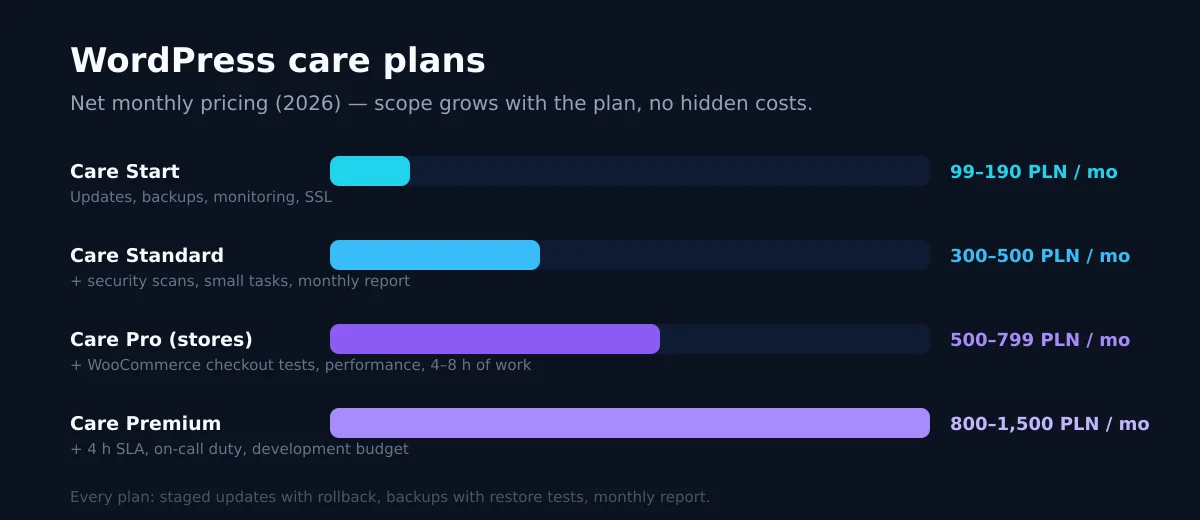
WordPress maintenance is a monthly plan: staged updates, backups with restore tests, 24/7 monitoring, security and support — from 99 PLN net/month. Maintenance plans differ in scope and response time (SLA), and every month ends with a maintenance report. Below: four plans, what each covers and current pricing.
Maintenance plans — Care Start, Care Standard, Care Pro and Care Premium
Care Start (99–190 PLN net/month) covers core, plugin and theme updates via staging, file and database backups, uptime monitoring and SSL. Care Standard (300–500 PLN) adds security scans, small content tasks and a monthly report. Care Pro (500–799 PLN) is for WooCommerce stores and services: checkout testing, performance optimisation and 4–8 hours of work. Care Premium (800–1,500 PLN) adds a 4 h SLA, on-call duty and a development budget.
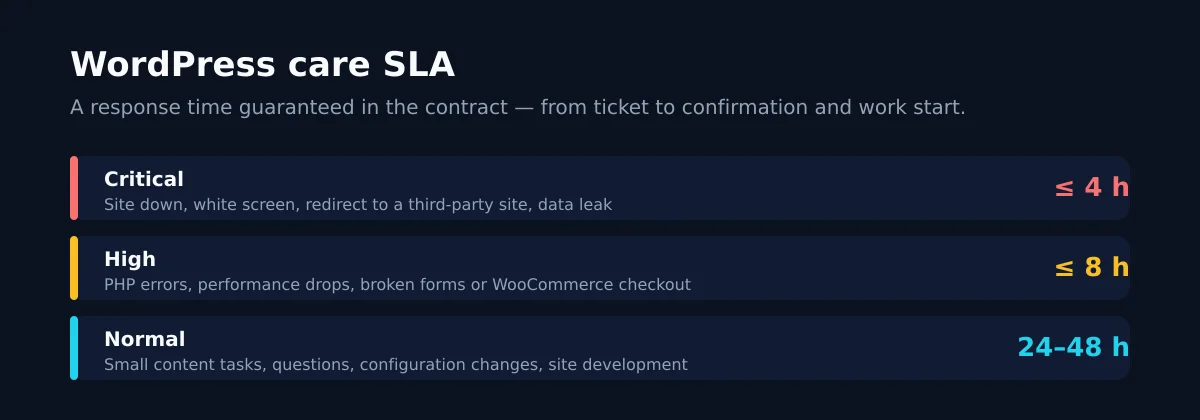
Response times (SLA): critical within 4 h, high within 8 h, normal 24–48 h
The contract guarantees a response time: critical (site down, redirect to a third-party site) within 4 h, high (PHP errors, performance drop, broken checkout) within 8 h, normal (small tasks and questions) within 24–48 h on business days. Tickets go through one channel — email or helpdesk — with an acknowledgement and status updates.
SLA and reporting in practice
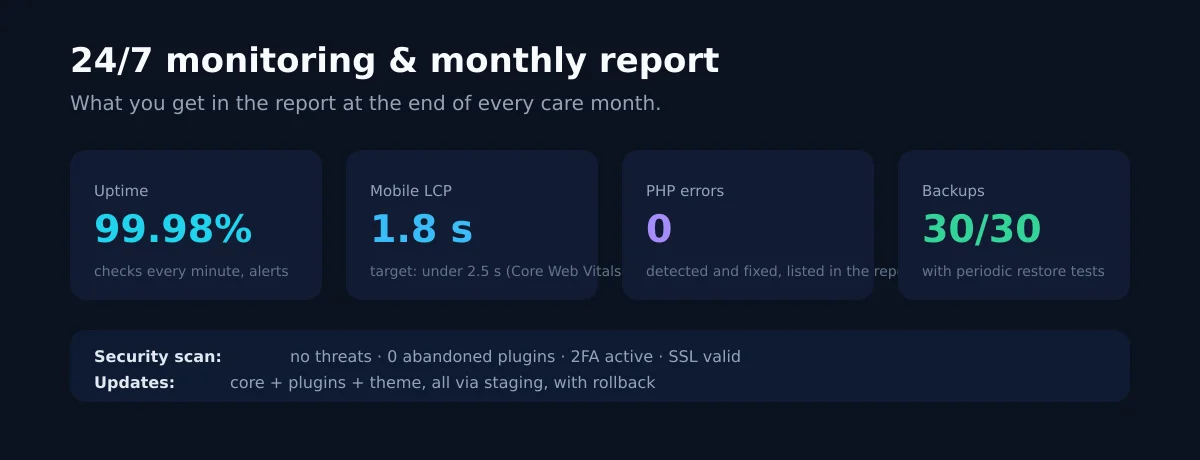
The response time is written into the contract, and every month ends with a maintenance report on the work done. The monthly maintenance report covers: completed updates, backup status, the security scan result, uptime, load time (Core Web Vitals) and recommendations for the next month.
Monthly maintenance report — what it contains
The report is not statistics for statistics: a dated update log, backup and restore-test confirmation, the security scan result, uptime percentage, load time and a list of recommendations. On that basis you decide what we do next — no guesswork.
Quarterly plugin and performance review
Once a quarter I review plugins and performance: remove abandoned extensions, verify compatibility with the current WordPress and PHP versions, measure Core Web Vitals and tidy the database. Care is meant to be proactive — before users notice a problem, not after.
When WordPress is the right choice
WordPress works well for a corporate site or blog you will grow yourself, a WooCommerce store with a medium catalogue, a content service with multiple authors, or a multilingual site. It is also unbeatable on cost for simple builds — a proven ready-made theme lets you launch in two weeks on a reasonable budget. I advise against it when you need custom business logic, advanced permissions, ERP integrations, or tens of thousands of products — Laravel or a dedicated e-commerce platform fits better there.
Development or care — or both?
Many clients start with a build and move into a maintenance plan; others take over an existing site and begin with an audit. Both paths work — what matters is that after launch someone keeps the site updated, backed up and monitored. Maintenance plans start at 99 PLN net/month, and a one-off rescue (malware, outage) is available if you prefer to stay without a subscription.
Custom theme or ready-made template?
A ready-made template is the fastest and cheapest route — I pick licensed, regularly updated ones and configure them around the brand, not the other way round. A custom theme makes sense when the design is unusual, performance requirements are strict, or the template generates too much dead code and scripts. In both cases I work on child themes so updates never wipe your changes — the most common mistake I see in inherited projects.
WordPress security and updates
Security is a process: a security audit on day one, hardening, and regular updates. When taking over a site, I start with a WordPress security audit: WordPress, PHP and plugin versions, administrator accounts, file settings and security headers. I remove unused plugins and themes, enforce strong passwords and two-factor login, restrict panel access and disable file editing from the dashboard.
WordPress security audit — what we check
A WordPress security audit checks: WordPress, PHP and plugin versions; administrator accounts and permissions; file and directory settings; security headers; exposed endpoints (XML-RPC, REST); backup status and the last restore test. You receive a prioritised list — quick wins first — and a fixed quote for the fixes.
Update management
Update management is not clicking "update everything": before each update I review plugin changelogs for breaking changes, take a backup and test on staging. Critical security patches ship outside the cycle — as a priority.
Hardening: 2FA, WAF, permissions
Hardening includes: two-factor login for every administrator account, an application firewall (WAF), login throttling, correct file permissions, disabled XML-RPC and dashboard file editing, plus file-integrity monitoring. This closes the most common infection vectors clients bring to me.

Malware removal and rescuing sites
An infected site is not just embarrassing — it leaks customer data and earns a Google penalty for hosting malicious code. I remove malware, backdoors and redirects, clean the database and files, close the infection vector and restore the site to Google index. Afterwards I deploy preventive security and — if data was breached — help assess your notification duties under GDPR.
Typical infections and redirects
The most common infections: redirects to third-party sites (including ones visible only to Googlebot or mobile visitors), SEO spam with foreign pages, backdoors hidden in the uploads directory and payment skimmers in WooCommerce stores. Each type needs a different order of operations — that is why I always start by identifying the entry vector.
Back to the Google index
After cleanup I submit the site for review in Google Search Console, remove spam URLs and resubmit the sitemap. The Google warning usually clears within days and rankings recover gradually — I monitor the process. Most infected sites come to me precisely to get back into search results.
WooCommerce and WordPress stores
WooCommerce is a good choice for medium-catalogue stores when you want full ownership and no sales commission. I build and maintain stores with payment gateways (Przelewy24, PayU, Tpay, Stripe), shipping integrations (InPost, DHL, DPD), invoicing and stock synchronisation with marketplaces. I also configure Omnibus compliance and WCAG accessibility. For larger catalogues and complex integrations I recommend PrestaShop or a custom build — WooCommerce performance has its limits.
Payments, shipping and invoicing
I configure payment gateways (Przelewy24, PayU, Tpay, Stripe, BLIK), shipping integrations (InPost, DHL, DPD), invoicing and marketplace stock sync via BaseLinker. In store care I test the purchase path after every update — the cart and checkout are where a bug costs the most.
Omnibus and WCAG accessibility
I align stores with the Omnibus Directive (30-day lowest price, promotion disclosures) and WCAG 2.1 accessibility — the European Accessibility Act covers more and more stores. This is not optional: non-compliance is a real UOKiK fine risk.
WordPress speed optimization
Speed optimization starts with measurement, not with installing more plugins. I check what actually blocks rendering and what accounts for the largest contentful element (LCP). In practice it is server-level cache, WebP and AVIF image conversion, lazy loading, fewer third-party scripts, database hygiene and correct cache headers. The result is LCP under 2.5 s on mobile — measured, not claimed.
Core Web Vitals and LCP under 2.5 s
Core Web Vitals — LCP, INP and CLS — are the metrics Google uses in ranking and users actually feel. The target for sites in care: LCP under 2.5 s on mobile, INP under 200 ms, CLS under 0.1. I measure them on production, not just in a lab.
Cache, images and the database
The biggest WordPress performance reserves: server-level cache (Nginx + Redis), WebP and AVIF images, lazy loading, fewer third-party scripts and a clean database — without thousands of transient rows and orphaned records. I also review the theme: a heavy page builder can ruin the best server.
Migration and taking over a site
I take over sites from previous contractors, from agencies that disappeared, and from failed builds. I start with an inventory: what is inside, who holds access, where the backups are and whether the site belongs to the client. Then I clean up hosting and domain, verify plugins, fix errors and move to ongoing care. I migrate to another host or from another system without downtime, preserving URLs and 301 redirects — so you do not lose earned Google positions.
Inventory and access
Taking over a site starts with a list: hosting, domain and WordPress panel access, the plugin list and licences, verification of code ownership and backups. If the previous contractor withholds access, I help establish who owns the domain and code, and recover control of the project.
Zero-downtime migration without losing SEO
I plan migrations to another host (or from another CMS) so users never notice: a backup, deployment on the target server, testing, DNS switch and 301 redirects for every URL. After the migration I check indexing in Google Search Console — so years of earned rankings are not lost.
Administration, hosting and the server
WordPress administration is a list of tasks (updates, backups, monitoring), while care is a contract with a defined scope, response time and reporting — administration reacts to tickets, care prevents them. Whatever the label, the key question is: who is accountable when something breaks. As part of care I also verify the layer below WordPress: hosting, the server and the PHP configuration.
WordPress administration vs care
Administration is a task list: update, back up, check uptime. Care is accountability for the outcome: a plan, a response time, reporting and initiative. The difference shows during an incident — with administration you hear "that was not in scope"; with care you have a documented response time and a recovery procedure.
Hosting checklist for WordPress
WordPress hosting should have: PHP 8.3+ (8.4 preferred), NVMe disks, server-level cache (Nginx + Redis), WP-CLI support, host-side backups and technical support with a realistic response time. On weak hosting even the best care cannot make a site fast — so I verify hosting and recommend a migration when needed.
Server stack
I work on the stack: Nginx, PHP 8.4, MySQL/MariaDB, Redis, Cloudflare. I check PHP memory and execution limits, OPcache configuration, database connections and security headers. Server configuration is part of care, not a separate project to quote.
Analytics and SEO for WordPress
Care also means watching visibility: analytics and technical SEO. I set up and maintain Google Analytics 4 (GA4), Google Tag Manager and Google Search Console, monitor indexing errors, verify structured data (schema.org) and Core Web Vitals performance. The monthly report shows traffic, queries and positions — not just uptime.
Google Analytics 4 and Search Console
I configure GA4 with tags via Google Tag Manager (with GDPR compliance and Consent Mode), connect Search Console and monitor indexing, 404 errors and structured data. Without this the site runs blind — with analytics you know which pages sell and which merely exist.
Technical SEO in care
As part of care I watch technical SEO: meta titles and descriptions, heading hierarchy, XML sitemaps, redirects, structured-data validity and Core Web Vitals. This is continuous work — after some updates WordPress quietly loses details that cost rankings.
Emergency WordPress support and outages
When a site stops working — white screen, 500 error, plugin conflict after an update — emergency support is the priority. Maintenance plans include an emergency response: critical outages come with a response time of up to 4 h, and Care Premium adds on-call duty for outages and security incidents. I diagnose the cause, restore the site from backup or fix the code, then document what happened and how to prevent a repeat. Most clients come to me after an outage "nobody was watching" — maintenance exists so outages do not happen.
White screen, 500 error, plugin conflicts
The most common WordPress outages: a white screen after an update (PHP error or memory limit), a 500 error (plugin conflict, corrupted files), redirect loops and lost database connections. Each case needs a different recovery procedure — a backup and logs are crucial, which is why maintenance starts with putting them in order.
Restoring from backup
Restoring a site from backup takes minutes when backups are made and tested regularly. In maintenance plans I keep backups off-server and know exactly how to return to the pre-incident state — the difference between an incident and a catastrophe.
White-label WordPress maintenance for agencies
Agencies and studios hand over WordPress maintenance to me under a white-label agreement: you keep the client relationship, I keep the sites updated, backed up, secure and monitored — under your brand, with reports you can forward. White-label maintenance covers single sites and multi-site portfolios, with a priority queue, agreed response times and per-site pricing that leaves room for your margin.
How white-label maintenance works
We agree scope, response times and pricing per site. I work in your tools or mine, communicate through your channels and sign an NDA. Reports and client-facing documentation come branded for your agency — your client sees your brand, not mine.
Multi-site care and portfolio pricing
Portfolio plans start at 10 sites: a shared maintenance schedule, consolidated reporting, a dedicated Slack or email channel and volume pricing. You get one invoice, one report format and one partner — instead of juggling freelancers.
How much does WordPress maintenance cost in 2026?
WordPress maintenance pricing in Poland starts at around 149–199 PLN net/month with solo providers and reaches 1,500 PLN/month and beyond at agencies with SLAs. My maintenance plans start at 99 PLN net/month (Care Start) and include staged updates, backups with restore tests and 24/7 monitoring — scope some providers only offer in their pricier tiers. The table below compares public market pricing.
Packages and rates
Four monthly maintenance plans — from basic updates to a full SLA. Each plan covers a different maintenance scope: updates, backups, security, performance work and support hours. You can change plans as the site evolves; scope, exclusions and pricing are written into the contract.
Care Start
99–190 PLN net/mo
updates, backups, monitoring
Entry-level monthly maintenance plan for business sites and blogs: core, plugin and theme updates via staging, file and database backups, uptime monitoring and SSL.
- Staged updates with a rollback plan
- Off-server backups
- 24/7 uptime monitoring
- SSL and baseline security
Care Standard
300–500 PLN net/mo
+ security, tasks, report
For sites that grow and need ongoing changes: security scans, small content tasks within a bank of hours and a monthly report.
- Everything in Care Start
- Security scans and hardening (2FA, WAF)
- Small content tasks in a bank of hours
- Monthly report with recommendations
Care Pro (stores & services)
500–799 PLN net/mo
4–8 h of work, WooCommerce
Care for WooCommerce stores and services: checkout testing after every update, performance optimisation and 4–8 hours of work per month.
- Everything in Care Standard
- Cart and checkout tests after updates
- Performance and Core Web Vitals work
- 4–8 hours of development per month
Care Premium
800–1,500 PLN net/mo
4 h SLA, on-call
Maximum protection for critical sites and stores: a 4 h response SLA, on-call duty for outages, a development budget and priority support.
- Everything in Care Pro
- SLA: critical within 4 h, high within 8 h
- On-call for outages and security incidents
- Development budget and priority support
Contract, security and code ownership
SLA written into the contract
Response times (critical 4 h / high 8 h / normal 24–48 h) are contract terms, not promises — with a single ticket channel, acknowledgements and status updates.
Backups with restore tests
Off-server backups of files and database, with periodic restore tests on staging. You can request a restore at any time — that is what the plan pays for.
You own the code, domain and accounts
Everything runs on your hosting, domain and accounts. On exit you receive documentation, access and a handover call — no vendor lock-in.
GDPR-compliant processing (DPA)
A data processing agreement (DPA), EU-based servers and documented access control. If an incident happens, you get a written report and support with your notification duties.
Market rate comparison
Public price lists of selected providers (10.2026).
| Provider | Rate | Note |
|---|---|---|
| informatix | from 99 PLN net/mo | Staged updates, backups with restore tests, 24/7 monitoring; 4 h SLA in Care Premium |
| MSERWIS (WPSiteSupport) | from 149 PLN net/mo | Hosting + care bundles, public price list |
| thenewlook.pl | from 160–190 PLN net/mo | WordPress and plugin updates on subscription |
| ideative.pl | from 149 PLN net/mo | Updates, backups, monitoring, infection removal |
| HelpGuru.eu | from 199 PLN net/mo | 24/7 monitoring, monthly backup, report and alerts |
| JCD.pl | from 1,500 PLN net/mo | Agency-grade care with a 4 h response time |
Public price lists of WordPress care providers (10.2026). Net monthly pricing; scopes differ — compare scope, not just price.
Technology stack
Legal basis and standards
Related services
- Website development The full website offer — WordPress and Laravel.
- E-commerce store development Stores on WooCommerce, PrestaShop and SaaS platforms.
- Technical care & SLA Ongoing care for a site, store or application — plans and response times.
- Legacy PHP modernization When the site needs clean-up, updates and monitoring.
- WordPress maintenance & care plans — scope and pricing Packages from 99–799 PLN/month, SLA, backups and a vendor checklist.
- WordPress administration — scope and pricing How administration differs from care and what it should include.
- WordPress updates — a safe step-by-step process Staging, backups and rollback — why updates fail without a process.
- Taking over a WordPress site from another vendor Inventory, access recovery and a safe handover checklist.
- WordPress site audit — 30-point checklist Security, performance, technical SEO and infrastructure in 30 points.
- WordPress audit checklist (printable) A free 30-point list — print it and review your site step by step.
Worth reading
- Building a WordPress website — where to start Themes, plugins and the decisions that drive maintenance cost.
- WordPress website care — what it covers Updates, backups and monitoring in practice.
- WordPress administration — scope and pricing How administration differs from care and what it should include.
- WordPress updates — a safe step-by-step process Staging, backups and rollback — why updates fail without a process.
- WordPress malware removal — rescuing a site Where infections come from and how to secure the site afterwards.
- Taking over a WordPress site from another vendor Inventory, access recovery and a safe handover checklist.
- WordPress site audit — 30-point checklist Security, performance, technical SEO and infrastructure in 30 points.
- Emergency WordPress support — response times and costs What counts as a critical incident and how a 4 h SLA works in practice.
- White-label WordPress maintenance for agencies Keep the client relationship — hand the maintenance to a partner.
- WordPress maintenance checklist — weekly to quarterly A printable routine with a realistic 1–3 h monthly budget.
FAQ
How much do WordPress maintenance services cost?
Maintenance plans start at 99–190 PLN net per month (Care Start: updates, backups, monitoring, SSL). Care Standard with security, small tasks and a monthly report is 300–500 PLN, WooCommerce store care (Care Pro) 500–799 PLN, and Care Premium with a 4 h SLA from 800 PLN net/month. The pricing table above compares public market rates.
Does WordPress need maintenance?
Yes. Left alone, WordPress drifts into risk: plugins and core accumulate known vulnerabilities, backups age out, databases bloat and performance drops. WordPress releases updates monthly and plugin security patches even more often. Maintenance keeps a site updated, backed up, monitored and fast — most sites need 1–3 hours of maintenance work per month, which is exactly what a monthly plan covers.
How long does WordPress maintenance take?
For a typical business site: 1–3 hours per month (updates, backup checks, monitoring, small tasks) and 4–8 hours for stores in Care Pro. Security-critical patches ship outside the cycle as a priority. The exact scope is written into the plan and confirmed in the monthly maintenance report.
How much does it cost to pay someone to maintain a website?
In Poland, hiring a person or studio for WordPress maintenance typically costs 149–1,500 PLN net/month depending on scope and response times: freelancers start around 99–200 PLN, agencies with SLAs charge 500–1,500+ PLN. My plans start at 99 PLN net/month (Care Start). Compare scope, response times and what happens during an outage — not just the price.
Do you offer emergency WordPress support?
Yes. Emergency (critical) incidents — site down, white screen, redirect to a third-party site, broken checkout — come with a response time of up to 4 h in Care Premium, with priority handling in other plans. After recovery you get a written report: cause, actions taken and prevention. If you are not on a plan, a one-off rescue (outage or malware) is available.
Do you provide white-label maintenance for agencies?
Yes — a large part of my work is white-label WordPress maintenance for agencies and studios: I keep your clients' sites updated, backed up and monitored under your brand, with reports you can forward and per-site pricing that leaves room for your margin. Portfolio plans start at 10 sites with volume pricing and a dedicated channel.
How much does a WordPress site cost?
A build on a proven ready-made theme configured around your brand is 1,500–3,500 PLN net. Custom design and a dedicated theme 4,000–10,000 PLN. A WooCommerce store with payments, shipping and integrations 5,000–20,000 PLN. I quote after a scope analysis, and monthly care starts at 99 PLN net for a site and 300 PLN for a store.
What does WordPress care cover?
Staged core, plugin and theme updates, backups with periodic restore tests, uptime, load-time and PHP error monitoring, security (hardening, 2FA, WAF), small tasks within the plan hours and a monthly report. Scope, exclusions and example contract clauses are described in the WordPress website care guide.
How is WordPress administration different from care?
Administration is a task list — updates, backups, monitoring — usually reactive, on request. Care is a contract with scope, a response time (SLA), reporting and accountability for the site state: monitoring is proactive and you know exactly what will be done and when. The real question is who owns the outcome when something breaks.
Will you handle updates and backups?
Yes — it is the most common reason clients move to my care plan. The package covers WordPress, theme and plugin updates on staging, off-server backups, uptime and load-time monitoring, and bug fixes. Updates never go straight to production without testing.
How often do you run updates and backups?
Updates: core and plugins monthly (Care Start) or with every security-relevant release — critical patches ship outside the cycle as a priority. Backups: at least weekly in Care Start, daily in Standard and above, always off-server and with periodic restore tests. The schedule is written into the contract and confirmed in the monthly report.
What happens if a site is not updated?
An outdated WordPress is growing risk: plugins and core carry known vulnerabilities that attacks exploit within days of a patch release. Typical neglect outcomes: infection and redirects, SEO spam, performance drops, conflicts when updating months of changes at once — and in the worst case a Google malicious-code block. Restoring an infected site (400–2,500 PLN) usually costs more than a year of care.
My site has malware — can you help?
Yes. I remove malicious code, backdoors and redirects, clean files and the database, close the infection vector and restore the site to Google index. Afterwards I deploy preventive security and — if data leaked — help assess your GDPR duties. I start with a backup and an audit to establish how the infection got in.
Will you take over a site from another company?
Yes, I do this regularly. I start with an inventory: hosting, domain and panel access, plugin list, verification of code ownership and backups. Then I clean up the environment, remove unnecessary extensions and move to ongoing care. If a contractor withholds access, I help establish who owns the domain and code and recover control of the project.
Does care cover hosting and the server?
Care covers verifying and configuring the hosting layer: PHP version (8.3+), memory limits, OPcache, Nginx + Redis cache, host-side backups and security headers. The hosting bill itself stays with you (it is tied to your account), but if the host blocks WP-CLI or is too slow, I recommend a concrete change and migrate without downtime.
Do you optimise speed and Core Web Vitals?
Yes — it is a standing part of Care Pro and Care Premium, and a one-off task or quarterly review in lighter plans. Target: LCP under 2.5 s on mobile, INP under 200 ms, CLS under 0.1. I work on server cache, WebP/AVIF images, lazy loading, fewer third-party scripts and database hygiene. Results are measured in the report — on production data, not lab estimates.
Do you help with analytics — GA4 and Search Console?
Yes. I configure Google Analytics 4 and Google Tag Manager (with Consent Mode and GDPR compliance), connect Google Search Console, and monitor indexing, 404s, structured data and Core Web Vitals. The monthly report shows traffic, key queries and technical issues — care also means watching whether the site is visible in Google.
How fast do you respond to an outage?
Critical outages — site down, white screen, redirect to a third-party site — come with a response time of up to 4 h (Care Premium; priority handling in other plans). I diagnose the cause, restore from backup or fix the code, and after recovery you get a write-up: what happened, what was done and how to prevent a repeat.
WordPress or WooCommerce — can you build a store?
Yes, WooCommerce is the most common choice for a medium catalogue when ownership and zero sales commission matter. I configure payments (Przelewy24, PayU, Tpay, Stripe), shipping (InPost, DHL, DPD), invoicing and marketplace synchronisation. For very large catalogues or complex ERP integrations I recommend PrestaShop or a custom build.
Krzysztof Słonina
Senior full-stack developer, owner of Inoventis Solutions
16 years in PHP/Laravel and WordPress: builds, technical care, security and performance. I run care plans for business sites, WooCommerce stores and services — with an SLA, monthly reporting and full documentation.
Results from real projects
PHP application modernization
Zero critical incidents for 12 months
Read the case studyCRM application and client portal
50% less time on administrative work
Read the case studyIndicative ranges for this service: see pricing
Web app requirements checklist
12 control questions to answer before talking to a vendor — faster estimates, fewer hidden costs.
Does your WordPress site need tidying up?
Let us run a security and performance audit. You will get a prioritised list and a care quote — with no obligation.
Book an audit