PHP Application Modernization
How a business-critical PHP 5.6 application — no tests, no backups, manual FTP deployments — became a tested, containerized PHP 8.4 system with CI/CD and monitoring. Without a big-bang rewrite. Without downtime.
Key takeaways
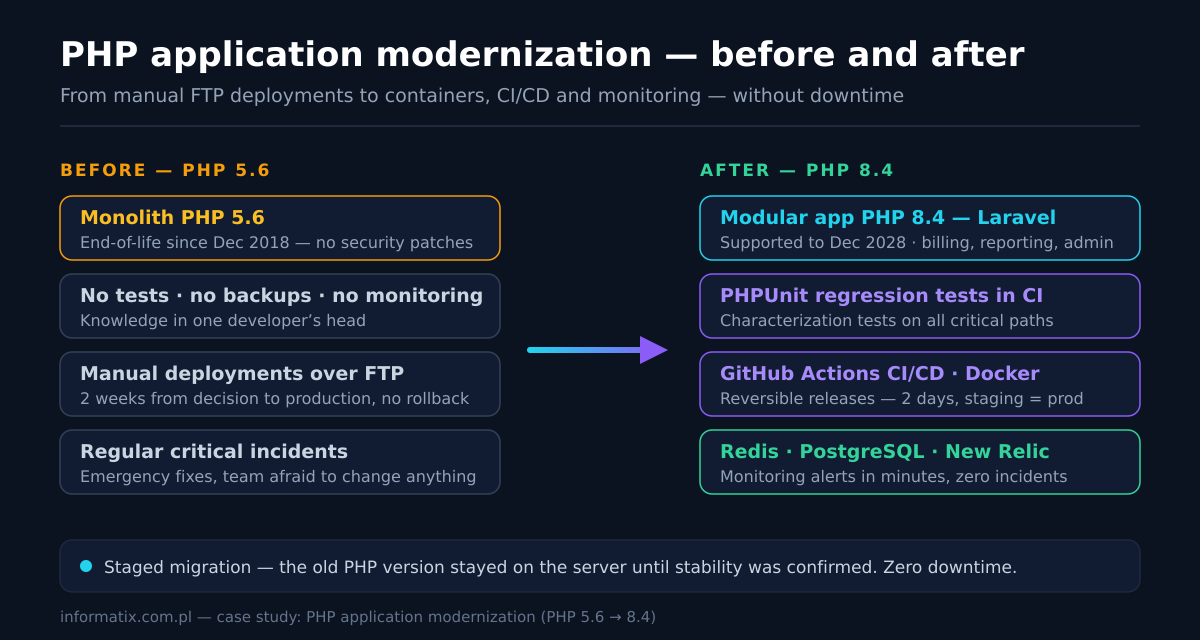
The system ran on PHP 5.6 — end-of-life since December 2018, without security patches. Every change was a gamble: no tests, no backups, deployments by hand over FTP, and critical incidents nobody could explain. The fix was not a rewrite from scratch. It was a modernization in stages: a code audit (PHPCompatibility, PHPStan, dependency inventory), a safety net of characterization tests, module-by-module refactoring with Rector, CI/CD with GitHub Actions and Docker, and monitoring that catches problems before users do. Result: zero critical incidents in 12 months, deployments down from 2 weeks to 2 days, maintenance costs down 60%.
Challenge
A business-critical application built years earlier on PHP 5.6: customer processes, billing and reporting ran through it every day. The codebase had no tests, no backups and no documentation — the knowledge lived in one developer’s head. Deployments were manual, over FTP, at night, with the team holding its breath; a single change took two weeks from decision to production. The PHP version had been end-of-life since December 2018, which meant known security vulnerabilities with no patches — and the system handled personal data, so this was a compliance risk, not just a technical one. Every incident was diagnosed from memory. Nobody could safely say what would break if a dependency was updated, so nothing was updated. The classic deadlock of a legacy system: the cost of change grows with every month of doing nothing.
Solution
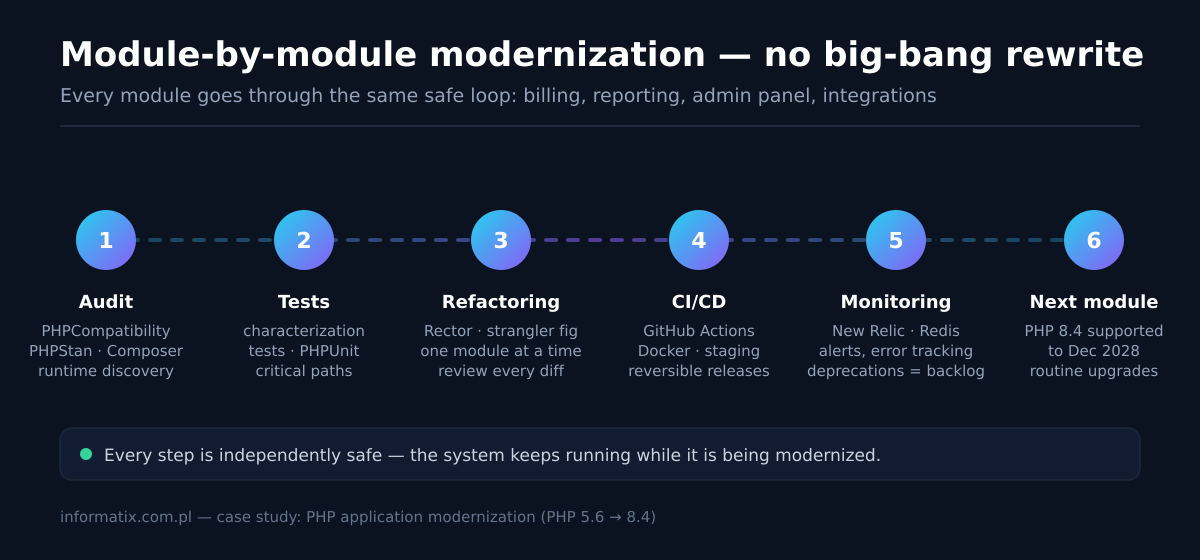
We modernized the application in stages instead of rewriting it. First a code audit: PHPCompatibility and PHPStan scans, a full dependency inventory with Composer and runtime environment discovery (PHP version, extensions, php.ini, web server, database). Then a safety net: characterization tests with PHPUnit on every critical business path. Then module-by-module refactoring — billing, reporting, admin panel, integrations — with Rector automating the version changes (5.6 → 7.4 → 8.x) and the strangler fig pattern keeping the old and new code working side by side. Each module shipped to staging, then production, with rollback ready. In parallel we replaced FTP with a CI/CD pipeline: GitHub Actions running the test suite, Docker containers making staging identical to production, and monitored releases. On top of that came observability — New Relic, error tracking and log alerts — so incidents surface as alerts, not as customer complaints. The old PHP version stayed on the server until stability was confirmed. Zero downtime across the whole program.
Result
Zero critical incidents in 12 months — after years of regular outages. Deployment time cut from 2 weeks to 2 days, which unblocked a backlog the business had stopped requesting. Maintenance costs down 60%: the team stopped paying the legacy premium for developers willing to work on PHP 5.6 and stopped losing days to manual releases. Test coverage on critical paths went from zero to a full regression suite that runs on every change. Backups and tested restores replaced “nobody touches the server”. Monitoring detects problems within minutes, not via user reports. And the key-person risk disappeared: the runtime environment is documented, the pipeline is reproducible, and any developer on the team can ship safely. PHP 8.4 is supported until December 2028 — the next upgrade is a routine, not a project.
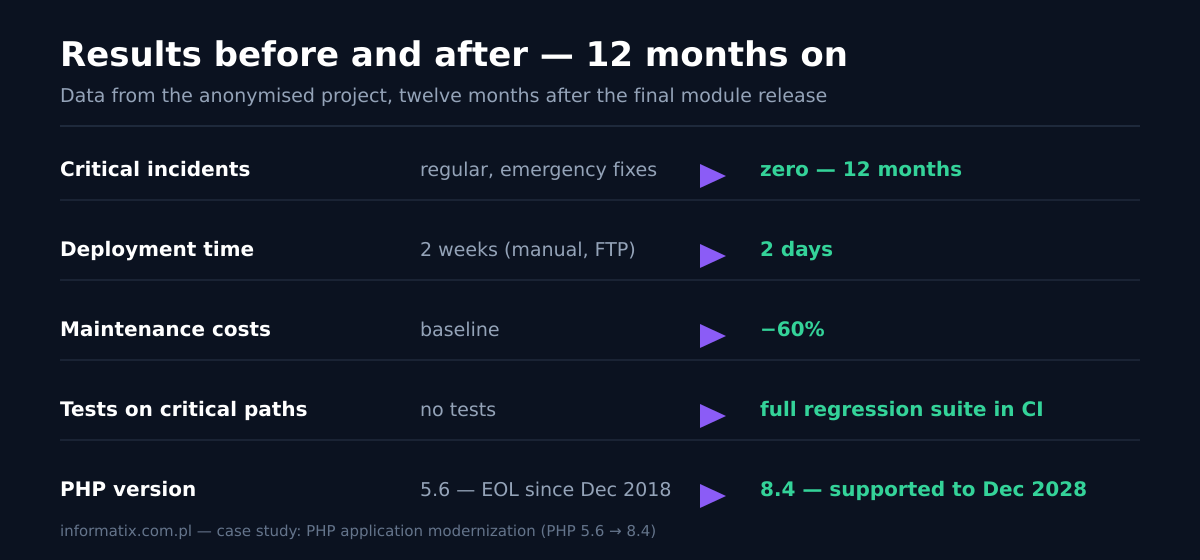
Results before and after
| Metric | Before | After |
|---|---|---|
| Critical incidents | regular, with emergency fixes | zero — 12 months |
| Deployment time | 2 weeks (manual, FTP) | 2 days |
| Test coverage of critical paths | no tests | full regression suite in CI |
| Maintenance costs | baseline | −60% |
| Backups and rollback | none | automated, with tested restores |
| Incident detection | from user reports | monitoring alerts in minutes |
| PHP version | 5.6 — EOL since Dec 2018 | 8.4 — supported to Dec 2028 |
Tech stack before and after
| Area | Before | After |
|---|---|---|
| PHP version | PHP 5.6 — EOL since Dec 2018 | PHP 8.4 — supported to Dec 2028 |
| Framework | plain PHP, no framework | Laravel on PHP 8.4 |
| Tests | no tests | PHPUnit — characterization tests and regression suite in CI |
| Static analysis | none | PHPStan and PHPCompatibility in the pipeline |
| Deployments | manual, over FTP, at night | GitHub Actions — CI/CD with one-command rollback |
| Environments | staging drifted from production | Docker — identical containers |
| Database and cache | PostgreSQL with no cache layer | PostgreSQL + Redis (cache, queues, sessions) |
| Monitoring | none — incidents from user reports | New Relic + error and log alerts |
| Backups | none | automated, with tested restores |
Starting point — a business-critical system nobody could safely change
The application ran on PHP 5.6 — a version without security support since December 2018. It processed customer data, billing and reporting every day, yet it had no tests, no backups and no documentation. Deployments were manual and happened over FTP, after hours; the full cycle from decision to production took about two weeks. Incidents were regular and diagnosed from memory, because nothing recorded how the system actually behaved. The team had stopped asking for changes — the backlog was full of features nobody dared to request. This is what technical debt looks like when it matures: not a number in a spreadsheet, but a business that quietly works around its own system. The compliance angle made it urgent: personal data processed by an interpreter with publicly documented, unpatched vulnerabilities is a GDPR exposure, not just a maintenance annoyance.
Why we did not rewrite from scratch — and what a legacy modernization strategy actually is
The instinct with legacy code is a full rewrite — and it is usually the most expensive way to fail. A rewrite means rebuilding years of undocumented business rules from scratch, with no way to verify the new system against the old one until it is too late. The alternative is a modernization strategy: keep the system running while improving it in verifiable steps. Audit first, then a test safety net, then incremental refactoring, then automation, then monitoring. Every step is independently safe and delivers value on its own. That is exactly how this project ran — and it is the approach behind every guide in our legacy modernization hub. Legacy code, by the way, is not “bad code”: it is working code written in the past, carrying business value that a rewrite would put at risk.
Step 1 — code audit: measuring the problem before touching anything
Modernization starts with discovery, not with code. We scanned the codebase with PHPCompatibility (constructs removed or changed in newer PHP versions), ran PHPStan for type and call errors that would become fatal on the target version, and inventoried every dependency with Composer — flagging abandoned libraries with no PHP 8-compatible release. In parallel we mapped the runtime environment: the exact PHP version and extensions, php.ini settings, the web server (nginx), the database (PostgreSQL) and Redis usage. This runtime discovery matters more than it sounds: configuration differences between environments are the most common source of “it works on staging, it broke in production”. The audit produced a blocker list split into three categories — auto-fixable, needs a human decision, library must be replaced — which doubled as the migration plan and the estimate. It also surfaced the documentation gap: critical knowledge existed only in the original developer’s head. We closed it with structured interviews and a written runtime map.
Step 2 — characterization tests: a safety net before the first refactoring
Refactoring code without tests is not modernization — it is gambling. But a legacy system has no tests to run, so the first testing task is different: characterization tests (the technique described by Michael Feathers) record what the system actually does today — including behaviour that looks like a bug — so any change that alters it becomes visible immediately. We covered the critical business paths first: login, customer processes, billing, document generation and reporting — 15–20 end-to-end tests caught the vast majority of risks. They ran in CI on the target PHP version from day one, which turned the upgrade from a leap of faith into a process with a clear acceptance criterion: green tests are the deployment condition. No test, no release — that rule alone eliminated the “we will hear it from users” release model.
Step 3 — module-by-module refactoring with Rector, not a big-bang rewrite
With a safety net in place, we refactored one module at a time: billing first (highest risk), then reporting, the admin panel and finally the integrations. Rector did the mechanical work — its rulesets for version transitions automated 80–90% of the changes from PHP 5.6 through 7.4 to 8.x: removed functions replaced, syntax modernized, deprecated constructs eliminated. Every Rector run went through the same loop: generate the diff, review it, run the full test suite, commit — version by version, so any error could be attributed to a specific change. Abandoned libraries were replaced with maintained alternatives; where none existed, the functionality moved into our code with tests first. Where a module needed deeper restructuring, we used the strangler fig pattern: new code grew behind the same interfaces while the old implementation kept serving traffic — the system was never “half-migrated”, it was always working. Symfony was evaluated as a framework target early on; the pragmatic choice was Laravel on PHP 8.4, matching the team’s skills and the existing database layer.
Step 4 — from FTP to CI/CD: GitHub Actions, Docker and reversible releases
The deployment process was the second root cause of incidents, so it got the same treatment as the code. We built a pipeline in GitHub Actions: every push runs the PHPUnit suite, static analysis and the build; merges to main deploy to staging automatically, and production releases are a monitored, one-command operation. Docker containers make staging and production genuinely identical — same PHP version, same extensions, same configuration — which eliminated the entire class of environment bugs. Every release has a rollback path: the previous image stays available, database migrations are written to be backward-compatible for one release, and the old PHP version remained on the server until stability was confirmed. Deployment time dropped from two weeks to two days, and — more importantly — releases stopped being events. Jenkins and Ansible were on the table; for a project of this size, GitHub Actions plus Docker was the pragmatic combination with the least moving parts to maintain.
Step 5 — monitoring: incidents should be alerts, not complaints
An application without monitoring is a system whose failures you learn about from customers. We instrumented the application with New Relic (response times, slow queries, error rates), added structured error tracking and log alerts, and put thresholds on the metrics that matter for the business: failed logins, payment-path errors, queue depth in Redis, database response times. Deprecation warnings from PHP 8 became a to-do list instead of noise — each one a small, scheduled cleanup rather than a future incident. The first month of alerts paid for the whole monitoring layer: two slow queries were found and fixed before users ever noticed them. Incident detection moved from hours (user reports) to minutes (alerts), and mean time to resolution dropped with it.
Challenges along the way — what no modernization plan shows
Every legacy modernization runs into challenges that no plan shows. First: abandoned libraries — several dependencies had no PHP 8 release and no maintained alternative, so their functionality had to be rebuilt in our own code, tests first. Second: undocumented business rules — behaviour that looked like a bug turned out to be a requirement; characterization tests froze it as a contract instead of “fixing” it silently. Third: key-person risk — knowledge about the system lived in one head, so we ran interviews and documentation in parallel with the refactoring. Fourth: resistance to change — after years of incidents the team feared every deployment; the first months of a green pipeline and alerts instead of customer phone calls turned that around. Fifth: environment drift — “it works on staging” stopped being an argument only when Docker made the environments identical. None of these challenges disappear with any methodology — the difference is that staged modernization makes them visible and solvable one at a time, instead of leaving them buried inside a big rewrite.
The PHP 5.6 → 8.4 migration itself — what broke and what we gained
The version path ran through checkpoints — 5.6 → 7.4 → 8.x — rather than one jump across three generations, so each step had its own test cycle and deployment. What actually broke was predictable in hindsight and expensive without preparation: removed functions (each(), create_function(), the old mysql_* extension, the /e modifier in preg_replace), stricter type handling that turned silent coercions into errors, null passed to non-nullable parameters (deprecated in 8.1), and dynamic properties (deprecated in 8.2) that several older libraries relied on. The characterization tests caught every one of these before production. The gains arrived with 8.x: JIT compilation, attributes instead of annotations, enums, constructor property promotion and readonly properties — and a measurable performance improvement of the interpreter itself, tens of percent on the heaviest endpoints, without touching business logic. PHP 8.4 is in full support until December 2028, with PHP 8.5 already available — the platform is now ahead of the roadmap instead of years behind it.
The team — removing the key-person risk and making modernization stick
Technology was half of this project; the other half was people. The original system depended on one developer who understood it — a key-person risk that had already caused one crisis when they were unavailable. We documented the runtime environment, wrote the deployment and rollback procedures down, and paired with the internal team throughout: developers and system administrators working through the same pipeline, closing the gap that DevOps culture is about. By the end, the client’s own developer shipped through the pipeline, read the alerts and planned the next module upgrades independently. Modernization that leaves the team behind is not finished — the handover was part of the acceptance criteria, not an afterthought.
Results — before and after, with numbers
Twelve months after the final module release: zero critical incidents, against a baseline of regular outages with emergency fixes. Deployment time down from 2 weeks to 2 days; deployment frequency up from “only when necessary” to several releases a month. Maintenance costs down 60% — the legacy premium for PHP 5.6 skills disappeared, and so did the manual release rituals. Backups run automatically with tested restores; monitoring detects anomalies in minutes. The test suite that started as 15–20 characterization tests now guards every critical path, and it is the reason dependency updates — previously impossible — are now a routine task. The metrics table above collects the before/after data from the anonymised project. The most important number is not in the table: the backlog the business had stopped requesting is moving again.
Business results — performance, scalability, reliability and user experience
Technical metrics translate into business language. Performance: JIT and OPcache in PHP 8.x plus fixing two slow queries made the heaviest screens tens of percent faster — without changing business logic. Scalability: Docker containers and Redis queues let the application scale horizontally when traffic grows, instead of replacing the server with a bigger one. Reliability: zero critical incidents in 12 months is not just about reputation — it means no more nights of emergency fixes and a predictable SLA for end customers. User experience: the modernization preserved full feature parity — users never saw the migration, but they started feeling a faster system; forms and reports respond noticeably quicker. Growth: an unblocked backlog means new features and new revenue instead of another year of status quo. Legacy modernization, then, is not a technical project — it is an investment in growth: maintenance costs down 60%, deployments from 2 weeks to 2 days, and a platform ready for the next years of development.
When modernization pays off — and how to start
The signals are consistent across legacy projects: an end-of-life PHP version, no tests, manual deployments, incidents diagnosed from memory, and knowledge concentrated in one person. Any two of those mean the cost of doing nothing is already compounding — maintaining a legacy system typically costs 2–3 times more than its modern equivalent, before counting the security and compliance exposure. Modernization pays off when the cost of doing nothing exceeds the cost of the work; for systems like the one in this case study, that point is usually years in the past. The first step is always the same and always cheap relative to the problem: a code audit that produces a blocker list, a risk map and a staged plan with an estimate. Typical scopes: a small project (a dozen thousand lines) modernizes in days to weeks; a medium system with frameworks and integrations takes 2–8 weeks; large legacy systems without tests are done in stages over several months. If you recognize your system in this case study, start with the audit — everything else is a decision you make with data in hand.
Lessons learned
Three lessons from this project, in order of importance. First: tests before refactoring, always — characterization tests are the difference between modernization and gambling, and they are the cheapest insurance in the whole program. Second: module-by-module beats big-bang — every module shipped and stabilized on its own, the system never stopped working, and the business saw progress from the first month instead of waiting a year for a rewrite. Third: monitoring from day one — the observability layer paid for itself in the first month, and it is what makes the other two lessons verifiable in production rather than on a whiteboard.
Frequently asked questions
Can you modernize a PHP application without rewriting it from scratch?
In the vast majority of cases, yes — and a rewrite is usually the riskier option. The modern approach is incremental: audit the code, build a characterization test safety net, then refactor module by module (billing, reporting, admin panel, integrations) using the strangler fig pattern, where new code works alongside the old until the module is fully replaced. This case study is exactly that path — no big-bang release, no downtime, and a rewrite of the entire system was never needed. A full rewrite makes sense only when the business rules themselves have changed beyond recognition or the target platform is fundamentally different.
How long does PHP application modernization take?
It scales with the state of the codebase, not with its age. A small project (a dozen thousand lines, no exotic dependencies) takes days to weeks. A medium system with a framework, integrations and a few abandoned libraries — like the one in this case study — takes 2–8 weeks of active work, usually spread over staged releases. Large legacy systems without tests are modernized in stages over several months. The audit is what turns these ranges into a concrete estimate for your system: it produces a blocker list and a staged plan you can budget against.
How much does PHP application modernization cost?
Typical ranges: 3,000–10,000 PLN for a small project, 10,000–40,000 PLN for a medium system with a framework and integrations, and from 40,000 PLN upward for large legacy systems, billed in stages. The two biggest cost variables are abandoned libraries (one dependency without a PHP 8 release can absorb a week) and the state of tests (a project with no tests requires building the safety net first — often the largest single line). We prepare a fixed quote after a free audit or scope analysis.
Is PHP still a good choice in 2026 — is PHP getting outdated?
PHP powers the majority of websites with a known server-side language — over 70% by W3Techs estimates — and the language itself has never been faster: PHP 8.x brought JIT compilation and modern language features (attributes, enums, readonly properties, property hooks in 8.4). The realistic question is not “PHP or something else”, it is “supported PHP or end-of-life PHP”. PHP 8.4 is in full support until December 2028 and 8.5 is already available. Frameworks like Laravel and Symfony ship current, well-maintained releases. Replacing PHP makes sense for workloads it was never good at (CPU-heavy computation), not for typical web applications that simply need a current version and a modernized codebase.
What is a legacy modernization strategy?
A legacy modernization strategy is a staged plan for improving an old system while it keeps running, instead of replacing it in one risky move. The sequence that works in practice: (1) code audit — compatibility scans, static analysis and dependency inventory produce a blocker list; (2) a safety net — characterization tests record current behaviour; (3) incremental refactoring — module by module, automated where possible (Rector), with the strangler fig pattern; (4) CI/CD and containers — deployments become automated and reversible; (5) monitoring — incidents surface as alerts. Every step is independently safe and delivers value, which is why this approach consistently beats big-bang rewrites.
Do we need to stop the system during the migration?
No. In this project the application never went down — not during the PHP version migration, not during module refactoring. The method: all work happens on staging with real data copies, production releases are scheduled outside peak traffic, database migrations are written to be backward-compatible for one release, and the previous version stays deployable as a rollback. Users see a routine release, not a migration. If your provider claims a migration requires downtime, that is a signal about the method, not a law of nature.
What PHP version should we target — and what about PHP 8.2 end of life?
Target PHP 8.4 (full support until December 2028) or 8.5 — the current stable branches. Two deadlines make this urgent in 2026: PHP 8.2 reaches end of life on 31 December 2026, and anything on 8.1 or older (including 5.6 and 7.x) is already without security patches. If you are migrating from 5.6 or 7.x, do not stop at 8.0/8.1 — those are past EOL. The safe path runs through an intermediate checkpoint version (e.g. 7.4), then to 8.4 — it is faster than it sounds because each step is small and testable.
Is running an end-of-life PHP version a real security risk?
Yes — and for systems handling personal data it is a compliance risk as well. An end-of-life PHP version receives no security fixes: vulnerabilities in the interpreter and standard libraries are publicly documented, and a running system becomes a known target. A WAF or network rules reduce exposure but do not patch the interpreter. In the GDPR context, processing personal data with unpatched, publicly known vulnerabilities is difficult to defend in an incident review. The migration itself — as this case study shows — can run without downtime, so “we cannot afford the risk of migrating” inverts the actual risk profile.
How do we start — what does the audit include?
The audit is the cheapest, highest-leverage stage of the whole program. It includes: a PHPCompatibility scan against your target version (what will break), PHPStan static analysis (type and call errors), a full dependency inventory with Composer (which libraries support the target PHP, which are abandoned), and runtime environment discovery (PHP version and extensions, php.ini, web server, database, cache). The deliverable is a blocker list split into auto-fixable, manual-decision and library-replacement items — which is simultaneously a migration plan, a risk map and the basis for a fixed estimate. Most audits take days, not weeks.
What tool accelerates legacy modernization?
In practice it is a set of tools, not one. Rector performs automated syntax migration between PHP versions — in this project it handled 80–90% of the mechanical changes (5.6 → 7.4 → 8.x). PHPCompatibility scans the code for constructs incompatible with the target version, and PHPStan catches type and call errors before they become fatal. Characterization tests (PHPUnit) freeze the current behaviour of the system so every change can be verified safely. GitHub Actions automates the whole cycle: tests, analysis and deployment. That combination — Rector + PHPCompatibility + PHPStan + tests in CI — shortens modernization from months to weeks.
Can you give me an example of legacy modernization?
Yes — this case study is exactly that example. A business-critical PHP 5.6 system (EOL since 2018, no tests, FTP deployments) went through a full modernization: audit, characterization tests, module-by-module refactoring with Rector, CI/CD and monitoring. The outcome after 12 months: zero critical incidents, deployments down from 2 weeks to 2 days, maintenance costs down 60%. More examples and the complete playbook live in our legacy modernization hub.
How to modernize legacy applications step by step?
The proven sequence: (1) code audit — PHPCompatibility, PHPStan, dependency inventory and environment mapping; (2) characterization tests on the critical business paths; (3) module-by-module refactoring with Rector and the strangler fig pattern; (4) CI/CD and containers — automated, reversible deployments; (5) monitoring — alerts instead of user reports. Every step is independently safe and the system keeps running the whole time — exactly how this case study project ran.
What is PHP being replaced with?
Rarely with anything — and usually it should not be. PHP powers over 70% of websites with a known server-side language (W3Techs), and modern 8.x releases are fast and actively developed. The realistic replacement scenarios are narrow: CPU-heavy computation (Python, Go), real-time applications (Node.js, Elixir), or systems where the team already lives in another ecosystem (Java, C#). For typical web applications and e-commerce the right answer is not switching languages but upgrading to a supported PHP version and modernizing the code — a stack migration usually multiplies cost without business gain.
Is anyone still using PHP?
Yes — the majority of the web. PHP runs on over 70% of websites with a known server-side language: WordPress, WooCommerce, PrestaShop, and on the application side Laravel and Symfony. The tooling ecosystem (Composer, PHPStan, Rector, PHPUnit) is mature and 8.x releases ship every year. Teams asking “is anyone still using PHP” are usually stuck on an end-of-life version — the problem is not the language, it is code that stopped being updated.
Is PHP still worth learning in 2026?
Yes, with one caveat: learn modern PHP. The job market for PHP remains one of the largest in web development — maintaining and modernizing existing systems is steady demand, and Laravel and Symfony are among the most chosen frameworks for new projects. The skills worth learning are PHP 8.x (types, enums, attributes), Composer, testing (PHPUnit/Pest), tools like Rector and PHPStan — and practical experience with legacy code, because modernizing old systems is one of the most sought-after skills today.
Krzysztof Słonina
Full-stack developer · 16 years of experience
I take over and modernize legacy PHP applications — audits, characterization tests, module-by-module refactoring, CI/CD and monitoring. If your system is stuck on an end-of-life PHP version, describe it and I will get back to you within 24 hours.
About the authorProject facts
- PHP path
- 5.6 → 7.4 → 8.4 (checkpointed)
- Timeline
- 6 months, in stages
- Downtime
- zero — staged releases with rollback
- Modules refactored
- billing, reporting, admin panel, integrations
- Test safety net
- characterization tests on all critical paths
- Delivery model
- audit → tests → refactor → CI/CD → monitoring
Technologies
Similar legacy system?
Free consultation — we will map your system, its risks and the first safe step.
Book a callRelated service
Legacy PHP modernization
Audit, refactor and upgrade of legacy PHP applications with regression tests and CI/CD.
See the serviceRelated services
- Legacy PHP modernization The service behind this project.
- Laravel development Continuing development after modernization.
- Hire a Laravel developer Taking over and developing an existing project.
- Legacy code modernization — step by step The full program behind this project: audit, tests, refactoring, CI/CD and monitoring.
- PHP migration and upgrade guide — 5.6/7.x to 8.x Compatibility audit, Rector, tests and deployment — with support dates and costs.
- Legacy code audit — scope, time and cost The five areas of the audit — the first step of this project.
- PHP migration cost — ranges and stages What makes up the cost and how to budget in stages.
Related articles
- Legacy code modernization — step by step The full program behind this project: audit, tests, refactoring, CI/CD and monitoring.
- PHP migration and upgrade guide — 5.6/7.x to 8.x Compatibility audit, Rector, tests and deployment — with support dates and costs.
- Legacy code audit — scope, time and cost The five areas of the audit — the first step of this project.
- PHP migration cost — ranges, stages and the cost of doing nothing What exactly makes up the cost and how to budget in stages.
- Strangler fig pattern — modernize without a rewrite How new code replaces old code module by module, without a big-bang release.
- Characterization tests — a safety net before refactoring How to record current behaviour before changing anything.
- Technical debt — how to measure and pay it down The business case for modernization: costs, risks and priorities.
- Rector — automated PHP upgrades The tool that did 80–90% of the version migration work.
- PHP 8.2 end of life — 31 December 2026: what to do The deadline, three scenarios and an action plan — why this project could not wait.
- PHP versions and support dates — EOL table The full PHP support schedule with a timeline and per-project recommendations.