Inertia.js renders pages in the browser by default — and that is fine for dashboards, admin panels and SaaS products behind a login. Public pages are a different story: without SSR the first paint waits for JavaScript, and Core Web Vitals suffer. This guide shows how to enable server-side rendering in an Inertia.js + Laravel app, from the first build to a production process that survives deployments.
If you are still choosing the architecture itself, start with Inertia.js with Laravel and React — SPA without a separate API.
When SSR is worth it (and when it is not)
SSR adds a second runtime to your stack: a Node process that renders React to HTML on every request. That is real infrastructure — worth it when:
- Public pages need fast LCP — landing pages, pricing, catalogs, blog.
- Content must be visible to crawlers without executing JavaScript.
- Social previews must show rendered content, not an empty shell.
Skip SSR when everything sits behind a login. A dashboard rendered in 300 ms client-side is a better experience than a dashboard that waits for a Node round-trip. Our rule: SSR for public traffic, plain client rendering for the app behind auth — Inertia lets you mix both in one codebase.
How Inertia.js SSR works
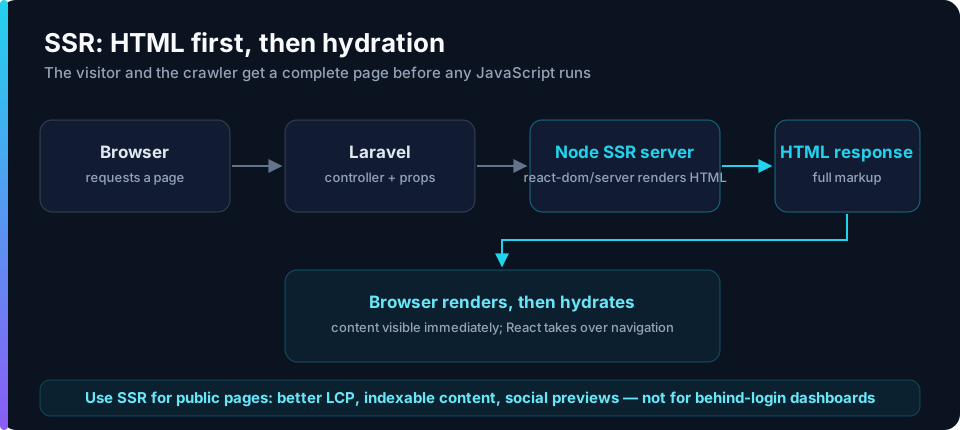
On every request Laravel builds the page object (component name + props), posts it to the SSR server, and gets back rendered HTML. That HTML is embedded in the response, so the browser paints immediately and React hydrates afterwards.
Setup step by step
The SSR entry is a second React entry point that renders to a string instead of mounting to the DOM
// resources/js/ssr.jsx
import { createInertiaApp } from '@inertiajs/react';
import createServer from '@inertiajs/react/server';
import ReactDOMServer from 'react-dom/server';

createServer((page) =>
    createInertiaApp({
        page,
        render: ReactDOMServer.renderToString,
        resolve: (name) => {
            const pages = import.meta.glob('./Pages/**/*.jsx', { eager: true });
            return pages[`./Pages/${name}.jsx`];
        },
        setup: ({ App, props }) => <App {...props} />,
    })
);
Vite needs to know about the second entry and build it for Node
// vite.config.js
export default defineConfig({
    plugins: [
        laravel({
            input: ['resources/js/app.jsx', 'resources/js/ssr.jsx'],
            ssr: 'resources/js/ssr.jsx',
            refresh: true,
        }),
        react(),
    ],
});
Add the SSR build to your scripts so a deploy can never ship a stale bundle
"scripts": {
    "build": "vite build && vite build --ssr"
}
Then enable SSR in the Inertia config and start the render server locally
// config/inertia.php
'ssr' => [
    'enabled' => true,
    'url' => 'http://127.0.0.1:13714',
],
php artisan inertia:start-ssr
View source in the browser — the page should now arrive as full HTML.
Deploying the render server
On a VPS the SSR process must be supervised like php-fpm: it has to restart on crash and on every deployment (it loads the built bundle into memory). We run it under PM2 next to the queue workers:
pm2 start "php artisan inertia:start-ssr" --name inertia-ssr --max-memory-restart 512M
pm2 save
- Deployment order matters: build assets, restart
inertia-ssr, then reload php-fpm. If the SSR server is down, Inertia raises an exception instead of silently degrading — that is a feature, but it means monitoring. We alert on the process, not just on HTTP 500s.
Warning: Browser-only APIs (
window,document,localStorage) do not exist in the SSR process. Guard them inuseEffector render them only on the client — otherwise the render server throws on the first request to that page.
What changes in your components
-
Move data fetching out of components into Laravel controllers — with SSR the server needs everything up front anyway.
-
Avoid random values and
Date.now()in render output; markup must match between server and client or hydration warns. -
Use deferred props for heavy data — the page ships fast, widgets fill in after hydration.
-
Deep dives: Inertia.js v2 — deferred props and prefetching and Testing Inertia.js applications.
FAQ
Does Inertia.js need server-side rendering?
No — it works without SSR and Google indexes client-rendered pages. SSR is for public pages where first paint and indexing reliability decide conversions.
Does SSR change how Laravel authentication works?
No. Sessions, middleware and policies are untouched; SSR only pre-renders the React page to HTML.
How much does adding SSR cost?
- Typically 1–3 days: the SSR entry, build pipeline, deployment supervision and fixing browser-only code paths.
👉 Planning a public-facing Inertia.js app? Check our Laravel development services or hire a Laravel developer — we ship SSR as a standard part of public builds.
📖 Read more: Inertia.js v2 features, Inertia.js vs Livewire and Inertia.js with Laravel and React.